Evaluating the 3D Merry Christmas Laser Engrave File for Holiday Production
The holiday season presents a unique window of opportunity for makers, small business owners, and creative professionals to generate revenue through seasonal goods. Success in this market often hinges on the quality of the digital assets used to create physical products. The 3d Merry Christmas Laser Engrave File represents a specific category of digital resource designed to streamline the creation of high-end holiday décor and gifts. Unlike standard vector cut files or low-resolution clip art, this asset is engineered specifically for grayscale laser engraving, offering a level of depth and texture that flat line art cannot achieve. For those operating CO₂ laser machines like Glowforge, LightBurn-compatible systems, or xTool devices, understanding the practical application and technical specifications of such files is essential for maintaining professional output standards.
Technical Specifications and Design Intent
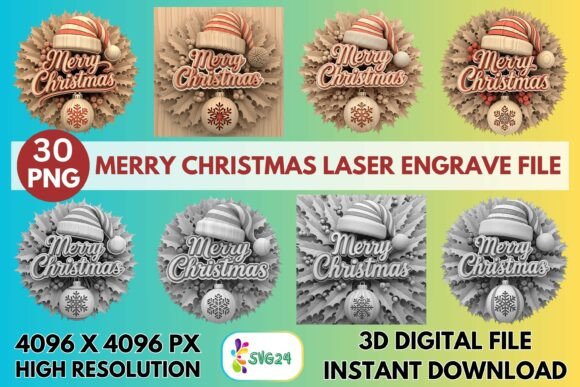
The core value proposition of the 3d Merry Christmas Laser Engrave File lies in its resolution and format optimization. At 4096×4096 pixels, the provided PNG files offer a substantial amount of data for the laser head to interpret. This high pixel density is critical when working with materials that require fine detail, such as light-colored woods, leather, or acrylic. Standard web images often lack the necessary bit-depth to render smooth gradients, resulting in banding or muddy details when engraved. This file set addresses that limitation by providing dedicated grayscale versions optimized for dithering algorithms.
What distinguishes this resource from generic downloads is the inclusion of both coloring and grayscale variations. The 15 grayscale PNG files are the primary workhorses for direct laser engraving. They are processed to ensure that the tonal range—from deep blacks to soft whites—translates effectively into laser power modulation. The accompanying 15 coloring PNG files serve a dual purpose: they can be used for sublimation projects where color is required, or as reference guides for hand-painting finished engravings. The transparent background ensures that the design integrates seamlessly into any layout software without the need for time-consuming masking or background removal.
Workflow Integration and Machine Compatibility
For a digital asset to be truly useful, it must fit smoothly into an existing production workflow. The 3d Merry Christmas Laser Engrave File is designed with compatibility in mind, supporting major platforms including Glowforge, LightBurn, Sculpfun, OMTech, and xTool. However, successful execution depends on how the user configures their machine settings relative to the file's characteristics.
When using a Glowforge, the recommended approach involves setting the mode to "Grayscale – Vary Power" with a speed of 1000 mm/min and a power of 90. A Lines Per Inch (LPI) setting of 270 is suggested to capture the intricate details of the 3D effect without over-burning the material. It is important to note that these settings are starting points; variables such as wood grain direction, humidity, and specific machine calibration will necessitate test runs. For users of LightBurn, the Jarvis dither algorithm is explicitly recommended. This dithering pattern excels at preserving mid-tones and creating the illusion of three-dimensionality, which is central to the aesthetic of this file set.
It is crucial to manage expectations regarding file types. This package consists of raster PNG files, not layered SVGs or DXF vectors. While vectors are superior for cutting outlines, they are often insufficient for rendering complex shading and gradients. Attempting to trace a grayscale image into a vector within Illustrator or CorelDraw usually results in a loss of detail and increased processing time. Therefore, the 3d Merry Christmas Laser Engrave File is strictly intended for engraving applications where the laser head modulates power based on pixel brightness rather than following a continuous path.
Material Performance and Aesthetic Results
The versatility of this file set extends across various substrates, though performance varies significantly by material type. Light-colored woods, such as birch plywood, maple, or basswood, provide the most dramatic contrast for the darkened areas of the engraving, allowing the "3D" shadow effects to pop against the natural grain. On darker woods, the contrast diminishes unless the wood is pre-treated with a whitening agent or paint. Leather offers another excellent medium; the organic texture of the hide interacts well with the detailed shading, producing a vintage, embossed look that is highly desirable for gift tags and wallet inserts.
Acrylic and coated metals also yield strong results, particularly when the goal is a polished, commercial appearance. The high resolution ensures that even small items like ornaments or coasters retain clarity. Textiles present a more challenging surface; while possible, the absorption rates vary, and care must be taken to avoid scorching synthetic fibers. Paper and cardstock are viable for signage or greeting cards, but the thinness of the material requires lower power settings to prevent burn-through. In all cases, the non-editable nature of the files means that resizing is the only manipulation available. Users should be aware that scaling the image beyond its native resolution will degrade quality, so planning the final product dimensions before importing the file is a necessary step.
Practical Value for Makers and Entrepreneurs
For entrepreneurs running Etsy shops or local craft businesses, time efficiency is as valuable as design quality. The 3d Merry Christmas Laser Engrave File reduces the design phase to zero, allowing creators to focus on production and marketing. The ready-to-print status eliminates the frustration of troubleshooting incompatible formats or fixing broken paths. This reliability is particularly beneficial during the peak holiday rush, where consistent output is required to meet order deadlines.
Furthermore, the variety within the set—fifteen distinct designs—allows for the creation of cohesive product lines. A maker can produce a matching set of wall art, coasters, and ornaments using the same visual theme, which enhances brand recognition and encourages bundle sales. The ability to create professional-grade items without hiring a graphic designer lowers the barrier to entry for new sellers while providing established businesses with fresh inventory options. The files are particularly well-suited for those who want to offer personalized touches; the clean lines and clear imagery make them ideal candidates for adding custom text or names alongside the main design.
Limitations and Strategic Considerations
While the asset offers significant advantages, potential buyers must weigh certain limitations. The primary constraint is the lack of editability. Because the files are flattened PNGs, users cannot alter individual elements, change colors within the design, or rearrange components. If a project requires a specific modification to the artwork, the user would need external graphic design skills to recreate the element, negating some of the time-saving benefits. Additionally, the reliance on grayscale dithering means that the final result is monochromatic unless combined with other finishing techniques like painting or dyeing.
Another consideration is the learning curve associated with optimizing laser settings. While recommended parameters are provided, achieving the perfect balance between detail and material integrity requires experimentation. Beginners may find that their initial attempts do not match the promotional examples, leading to wasted material. However, this is a universal challenge in laser crafting rather than a flaw in the file itself. The high resolution does demand more memory and processing power from the controlling software, which could cause slight delays on older computers or slower laser controllers.
Conclusion on Utility and Application
The 3d Merry Christmas Laser Engrave File serves as a robust tool for creators seeking to elevate their holiday product offerings. Its high resolution, optimized grayscale profiles, and compatibility with industry-standard machines make it a reliable choice for producing detailed, professional engravings. It bridges the gap between amateur craft and commercial quality, provided the user understands the technical requirements of raster engraving and manages material expectations appropriately. For those looking to expand their catalog with festive, high-impact items without investing hours in graphic design, this file set offers a pragmatic solution that balances quality with ease of use. By focusing on the strengths of the file—its depth, clarity, and readiness for production—makers can efficiently capitalize on the seasonal demand for unique, handmade goods.