3D Raven Laser Engrave File: A Practical Evaluation for Woodworkers
The landscape of digital laser engraving has evolved significantly, moving beyond simple line art to complex, textured imagery that mimics traditional carving. Among the specific assets available to makers and professionals is the 3D Raven Laser Engrave File. This digital bundle represents a specific niche within the broader category of laser-ready artwork, focusing on dark forest aesthetics, gothic themes, and wildlife motifs. For individuals researching materials for their next project, understanding the technical specifications, artistic utility, and operational requirements of this file type is essential before making a purchase or integrating it into a workflow.
Understanding the 3D Raven Laser Engrave File Format
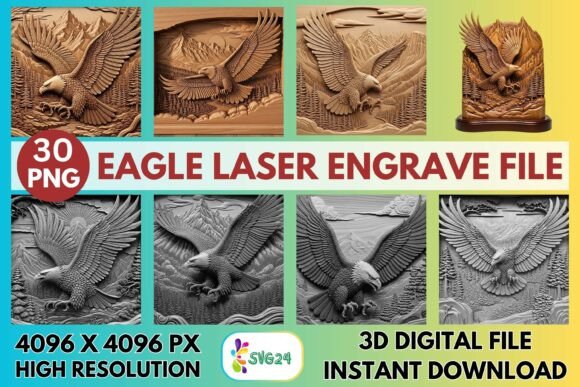
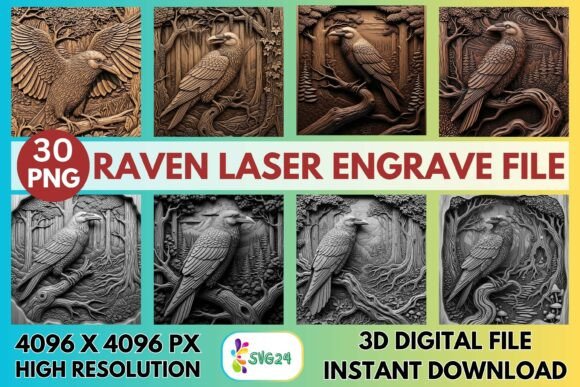
At its core, the 3D Raven Laser Engrave File is not a physical object but a collection of high-resolution digital images designed specifically for raster engraving. Unlike vector files (SVGs) which define shapes with mathematical lines and are ideal for cutting or simple outlining, this bundle consists of PNG files. These images utilize grayscale data to dictate how much power the laser applies at any given point on the material. Darker areas in the image result in deeper or more intense engraving, while lighter areas receive less energy, creating a gradient effect that simulates three-dimensional depth.
The specific bundle in question offers 30 distinct designs, split evenly between 15 coloring versions and 15 grayscale versions. Each image is rendered at a resolution of 4096×4096 pixels. This high pixel count is critical for large-format projects, as it ensures that the intricate details—such as the feathers of a raven, the texture of twisted roots, or the gills of mushrooms—remain sharp and do not appear pixelated when scaled up. The inclusion of transparent backgrounds allows these images to be easily placed over other design elements or onto specific sections of a workpiece without unwanted white borders.
Why Consider This Specific Design Bundle?
Makers often seek out the 3D Raven Laser Engrave File when they require imagery that conveys mystery, elegance, or a connection to nature. The thematic focus on ravens, deep forests, and dramatic textures aligns well with several popular market trends, including gothic décor, fantasy art, and rustic woodland signs. The "carved-style" aesthetic achieved through grayscale engraving provides a tactile quality that flat line art cannot replicate. When engraved on wood, MDF, or leather, the resulting piece appears to have been chiseled by hand, adding significant perceived value to the final product.
Furthermore, the versatility of the bundle addresses different stages of the creative process. The grayscale versions are ready for immediate use in monochromatic projects, offering a classic look suitable for plaques and wall art. Conversely, the coloring PNGs provide a base layer for those who wish to add paint, stain, or ink after the engraving process is complete. This dual-option approach allows artists to experiment with finishing techniques, potentially expanding their product range from simple engraved boards to multi-step decorative pieces.
Technical Compatibility and Operational Expectations
One of the primary advantages of this file format is its broad compatibility with modern laser equipment. The 3D Raven Laser Engrave File is optimized for CO₂ diode laser engravers, including popular brands such as Glowforge, xTool, OMTech, LightBurn, and Sculpfun. Because the files are standard PNGs, they can be imported into most laser control software without requiring complex conversion processes.
However, achieving the advertised results requires adherence to specific machine settings. The effectiveness of the engraving relies heavily on the "Grayscale – Vary Power" setting, where the laser adjusts its intensity based on the image's tonal values. Recommended settings often include a speed of 1000 mm/min, a power level around 90%, and a resolution of 270 LPI (Lines Per Inch). It is important to note that these settings serve as a baseline; actual performance will vary depending on the specific machine model, lens focal length, and the type of material being used. Users must be prepared to run test squares to calibrate power and speed for their unique setup.
Benefits and Tradeoffs
There are distinct benefits to utilizing a high-resolution PNG bundle like this one. The primary advantage is the visual depth it creates. By capturing subtle gradients, the files produce realistic shadows and highlights that make the raven and forest elements pop off the surface. Additionally, the 4096×4096 px resolution offers flexibility in sizing, allowing users to create small keychains or large wall panels without losing clarity.
Conversely, there are tradeoffs to consider. The most significant limitation is that these are raster files, not vector cut files. They cannot be used to cut the outline of a shape; they are strictly for engraving surfaces. If a project requires cutting a silhouette of a raven out of wood, this file alone will not suffice. Furthermore, because the files are provided as-is, the responsibility for resizing lies entirely with the buyer. Improper scaling in editing software can lead to distortion or loss of detail, requiring a basic understanding of image manipulation tools.
Situational Fit and Alternatives
The 3D Raven Laser Engrave File is an excellent fit for specific scenarios. It is particularly strong for creators producing rustic home décor, memorial plaques, or fantasy-themed gifts where texture and mood are paramount. It is also suitable for businesses looking to expand their catalog with high-end, detailed wood engravings without investing time in creating custom artwork from scratch. If your goal is to achieve a "hand-carved" look on materials like plywood, bamboo, or acrylic, this asset provides a streamlined path to that result.
However, alternatives may be worth considering if your needs differ. If you require precise cutting paths alongside engraving, a vector-based SVG bundle would be more appropriate. Similarly, if you are working with very large formats where file size becomes a bottleneck for your computer's RAM, lower-resolution options might be necessary, though this could compromise detail. For users seeking completely editable elements—where they want to move the raven to a different branch or change the tree structure—a vector illustration file would offer greater flexibility than a fixed PNG image.
Decision-Making Insights
Before deciding to acquire the 3D Raven Laser Engrave File, potential users should evaluate their current hardware capabilities and software proficiency. Ensure your laser machine supports grayscale engraving modes and that your control software can handle high-resolution PNG imports efficiently. Additionally, assess whether the specific aesthetic of dark forests and ravens aligns with your target audience or personal style. While the bundle offers 30 designs, the thematic consistency means it may not suit projects requiring bright, cartoonish, or minimalist styles.
Finally, remember that the success of the project depends on post-processing. The files deliver the engraving pattern, but the final finish often involves sanding, staining, or sealing to enhance the contrast and protect the material. Understanding the full workflow—from importing the PNG to applying the final coat of varnish—is crucial for maximizing the value of these digital assets. By weighing the technical requirements against the desired artistic outcome, makers can determine if this specific bundle is the right tool for their creative goals.